If you’ve ever built something with an LLM and asked “wait, why did it say that?”, LangSmith is the tool built to answer that question.
The problem it solves
LLM apps fail quietly. A chatbot gives a weird answer, an agent calls the wrong tool, a RAG pipeline retrieves the wrong document and there’s no stack trace, no error log, nothing red in your terminal. The app just did the wrong thing. Traditional debugging tools weren’t built for this, because the “bug” isn’t in your code. It’s somewhere inside a chain of prompts, retrievals, and model calls you can’t easily see into.
LangSmith, built by the LangChain team, exists to make that chain visible.
What it actually does
Think of it as an X-ray for your AI application. Every time your app runs, a chat response, an agent completing a task, a RAG query, LangSmith can record it as a trace: a step-by-step timeline of everything that happened, including:
- The exact prompt sent to the model
- What the model returned
- Every tool call, with its inputs and outputs
- What was retrieved (for RAG apps) and whether it was actually relevant
- Latency and token cost, broken down per step
You can click into any single step and see exactly what went in and what came out, which makes it much easier to spot where things went wrong instead of just knowing that they did.
The three main things people use it for
1. Tracing / debugging See the full execution path of a run. If an agent gave a bad answer, you can trace back through its tool calls and reasoning to find the exact step that derailed it.
2. Evaluation Instead of manually re-reading outputs every time you tweak a prompt, LangSmith lets you run your app against a saved dataset of test cases and score the results automatically, including with LLM-as-judge, where another model grades your app’s output for correctness, tone, or relevance. This turns “does my prompt change make things better or worse?” into something you can actually measure instead of guess.
3. Prompt management Version your prompts, test variations side-by-side in a playground, and roll back if a change makes things worse, similar to how you’d version code, but for prompts.
Do you need LangChain to use it?
No. That’s a common misconception. LangSmith works with any LLM app, raw OpenAI SDK calls, the Anthropic SDK, custom agent loops, whatever, via its own SDK or standard OpenTelemetry traces. It integrates especially smoothly with LangChain/LangGraph since they’re built by the same team, but it’s not locked to that ecosystem.
A complete example: a tool-calling agent, traced end-to-end (TypeScript)
Here’s a fuller example that’s closer to a real app, an agent with two tools (a weather lookup and a unit converter), fully traced in LangSmith. This shows exactly what LangSmith is actually useful for: seeing every tool call, its input/output, and the model’s reasoning between them.
1. Install dependencies
npm install langchain @langchain/google-genai zod
2. Set environment variables
export LANGSMITH_TRACING=true
export LANGSMITH_API_KEY="your-langsmith-api-key"
export LANGSMITH_PROJECT="weather-agent-demo"   # groups traces in the UI
export GOOGLE_GENAI_API_KEY="your-google-genai-api-key"
export GOOGLE_GENAI_MODEL="your-google-genai-model"
Setting LANGSMITH_TRACING=true is the only “integration” step required, LangChain automatically sends every run to LangSmith once these env vars are set. No SDK wiring needed inside the code itself.
3. Define tools
import { tool } from "langchain";
import { z } from "zod";

const getWeather = tool(
  async ({ city }) => {
    // Stub: in production this would call a real weather API
    const fakeData: Record<string, { tempC: number; condition: string }> = {
      "Tokyo": { tempC: 22, condition: "Cloudy" },
      "London": { tempC: 14, condition: "Rainy" },
      "Nairobi": { tempC: 26, condition: "Sunny" },
    };
    const data = fakeData[city] ?? { tempC: 20, condition: "Unknown" };
    return `${city}: ${data.tempC}°C, ${data.condition}`;
  },
  {
    name: "get_weather",
    description: "Get the current weather for a given city.",
    schema: z.object({
      city: z.string().describe("The city to check weather for"),
    }),
  }
);

const convertCelsiusToFahrenheit = tool(
  async ({ celsius }) => {
    const fahrenheit = (celsius * 9) / 5 + 32;
    return `${celsius}°C is ${fahrenheit.toFixed(1)}°F`;
  },
  {
    name: "convert_c_to_f",
    description: "Convert a temperature from Celsius to Fahrenheit.",
    schema: z.object({
      celsius: z.number().describe("Temperature in Celsius"),
    }),
  }
);
4. Create the agent
import { createAgent } from "langchain";
import { ChatGoogleGenerativeAI } from "@langchain/google-genai";

const model = new ChatGoogleGenerativeAI({
  model: process.env.GOOGLE_GENAI_MODEL!,
  apiKey: process.env.GOOGLE_GENAI_API_KEY!,
});;

const agent = createAgent({
  model,
  tools: [getWeather, convertCelsiusToFahrenheit],
  systemPrompt:
    "You are a helpful weather assistant. Use tools to look up weather " +
    "and convert temperatures when asked. Always show your final answer clearly.",
});
5. Run it, with tool calls streamed and logged
import { agent } from "./agent.js";

async function main() {
  const query = "What's the weather in Tokyo, and what is that temperature in Fahrenheit?";

  const stream = await agent.streamEvents({ messages: [{ role: "human", content: query }] }, { version: "v3" });

  await Promise.all([
    (async () => {
      for await (const message of stream.messages) {
        for await (const chunk of message.toolCalls) {
          console.log("tool call chunk", chunk);
        }
      }
    })(),
    (async () => {
      for await (const call of stream.toolCalls) {
        console.log(call.name, call.input);
      }
    })(),
    (async () => {
      for await (const message of stream.messages) {
        for await (const delta of message.text) {
          process.stdout.write(delta);
        }
      }
    })(),
  ]);
}

main();
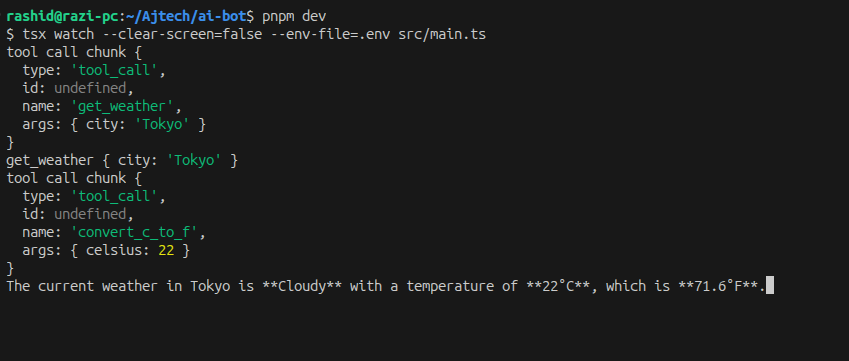
6. Expected console output
7. What you’d see in LangSmith
Because LANGSMITH_TRACING was set, this entire run, with zero extra code, now appears in your LangSmith project as a trace tree:
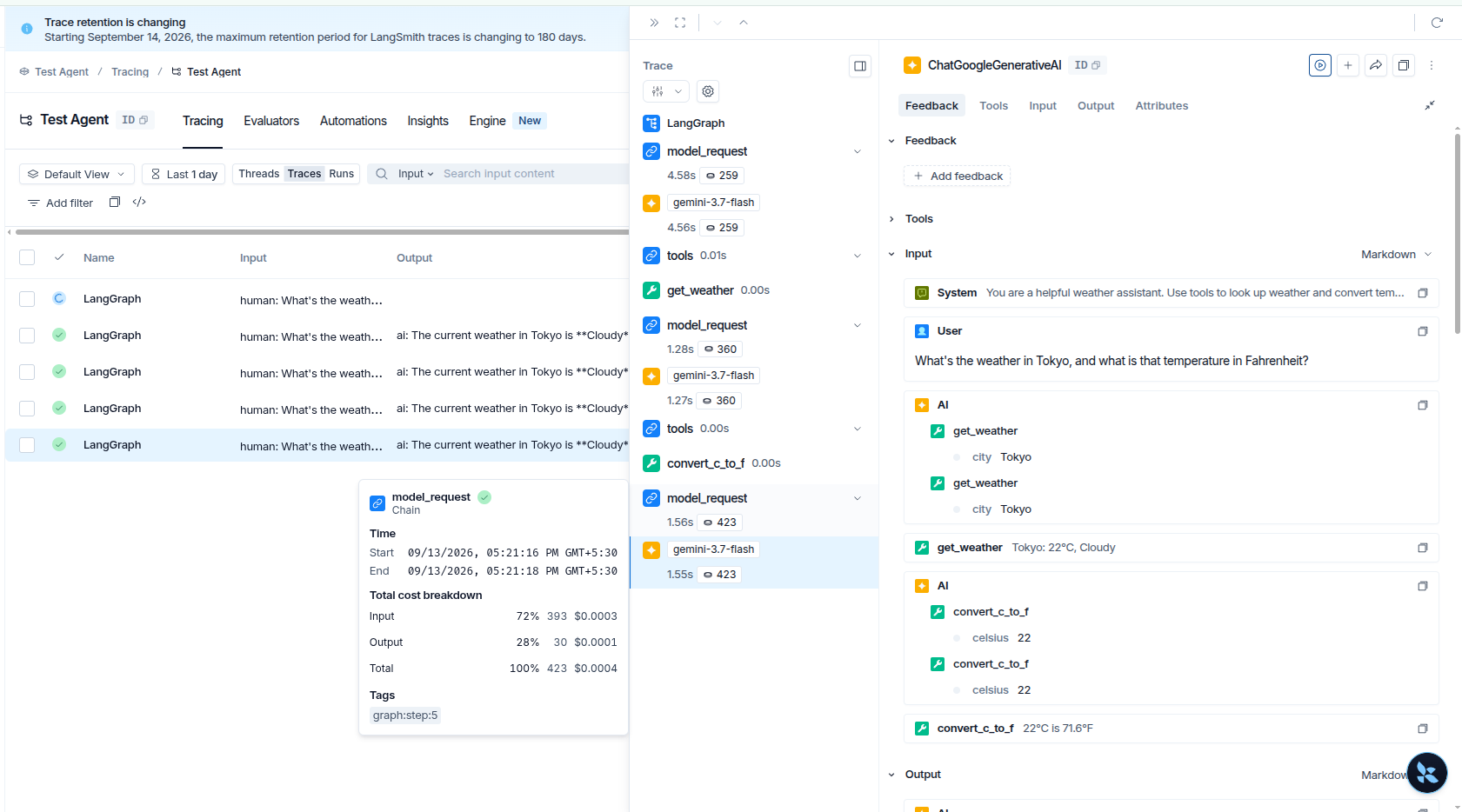
Click any node and you get the full raw input/output, token counts, latency, and cost for that exact step, which is the entire value proposition: instead of guessing which of the three model calls went wrong, you can see all three side by side.
Should you use it?
If you’re prototyping a single prompt in a notebook, probably not yet, it’s overkill. But the moment you’re building something with multiple steps (retrieval + generation, multi-tool agents, multi-turn conversations) or shipping to real users, “I can’t see what my app is actually doing” becomes a real problem fast. That’s the point where a tool like LangSmith stops being a nice-to-have and starts saving you real debugging time.